
B2B Portal Setup for Wholesale Customers with Cin7 Core
How to set up Cin7 Core’s B2B portal with price tiers, stock visibility, online ordering and payments for your wholesale customers.

Wholesale buyers want ordering to feel simple, fast and built for their business. They want to see the products meant for them, at their prices, and place repeat orders without picking up the phone.
A B2B portal brings all of that into one place. Cin7 Core's B2B portal gives your wholesale customers a branded online store connected straight to your inventory, with their own prices, live stock levels, online ordering and payment options.
This guide explains what a B2B portal is, what Cin7 Core's portal can do, and how to set it up around the way your wholesale business works.
What Is a B2B Portal?
A B2B portal is an online ordering site built for business customers. Each buyer logs in to their own account to:
- Browse your wholesale catalog
- See the prices set for their account
- Check stock
- Place and repeat orders
- Review invoices
- Pay online
For you, a wholesale portal links the customer's buying experience with your inventory, sales and accounting in one flow.
Why Connect Your B2B Portal to Cin7 Core?
Wholesale sales and stock move together. A customer orders, stock is reserved, the warehouse ships, purchasing reorders and finance records the invoice. When your B2B customer portal runs on Cin7 Core, every one of those steps works from the same data:
Wholesale customer → B2B portal → Sales order → Cin7 inventory → Fulfillment → Invoice and payment
What Cin7 Core's B2B Portal Can Do
Cin7 Core's B2B portal is a paid add-on built for wholesale buying. Here's what it covers.
Product lists for each customer group
You can run several portals, each with its own product list. A distributor portal can carry your full range, while a retail portal shows a focused selection.
Price tiers for each customer
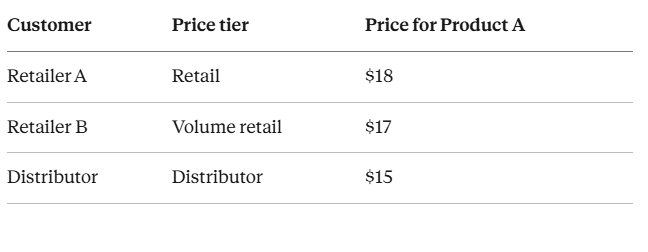
Cin7 Core supports up to 10 price tiers per product, and each customer is assigned a tier. Custom prices for individual customers take priority over tier prices. For example:
Order minimums and maximums
Set a minimum or maximum order value for the portal, and minimum or maximum quantities for each product you list.
Stock visibility
Choose what buyers see: exact quantities, a simple in-stock or out-of-stock label, or no stock details at all. You also decide whether out-of-stock items appear.
Invoices and payments
Customers can view invoices and pay online. Payment options include Cin7 Pay, PayPal, Stripe, Authorize.net and QuickBooks Payments, along with customer credit, money transfer, purchase orders and cash on delivery.
Your branding
Add your logo, set colors for the header, menu, content and footer, write your own login slogan, and add your terms, contact details and social links.
Access control
Invite the customers and sales reps who can log in and order. You can also turn on guest access, so anyone can browse your portal's home page while ordering stays with invited accounts.
How Wholesale Ordering Works in the Portal
On the customer's side, ordering takes four steps:
- Log in to their own account.
- Browse the products and prices set for them.
- Choose quantities, guided by your order rules.
- Place the order, which flows straight into Cin7 Core.
On your side, the order lands in Cin7 Core, where your sales and warehouse teams pick, pack and ship it through your usual inventory workflow.
How to Set Up Your B2B Portal in Cin7 Core: 6 Steps
A smooth setup starts with your business rules, then moves to the portal settings.
1. Map your customer groups
List your buyer types, such as retailers, distributors, resellers and trade customers. Each group may need its own products, prices and order rules.
2. Plan your product lists
Decide which products each group can buy, and whether each group needs a portal of its own.
3. Set your price tiers
Match each group to a price tier, such as standard wholesale, distributor or volume pricing. Add custom prices for key accounts.
4. Set your order rules
Choose minimum and maximum order values, product quantity limits, delivery schedules and payment terms.
5. Configure access
Decide who gets a private login, whether guests can browse, and which sales reps get access.
6. Choose how orders enter Cin7
Portal orders can arrive as an authorized quote, order or invoice:
- Quote: shows the price only, with no stock reserved.
- Order: reserves stock, ready for picking.
- Invoice: reserves stock and is ready to sync with your accounting software.
Example: A Home Improvement Distributor with 150 Retailers
Picture a distributor supplying hardware, tools, lighting and accessories to 150 independent retailers. Buying habits vary:
- Retailer A orders 20 to 50 units at a time.
- Retailer B orders 100+ units and is on the Volume retail price tier.
- Retailer C buys a small range of fast-moving products.
With a well-configured B2B portal, each retailer logs in, sees their products and prices, picks quantities and places the order. The order flows into Cin7 Core, where sales and the warehouse work from the same details.
B2B Portal vs. Ordering by Email and Phone
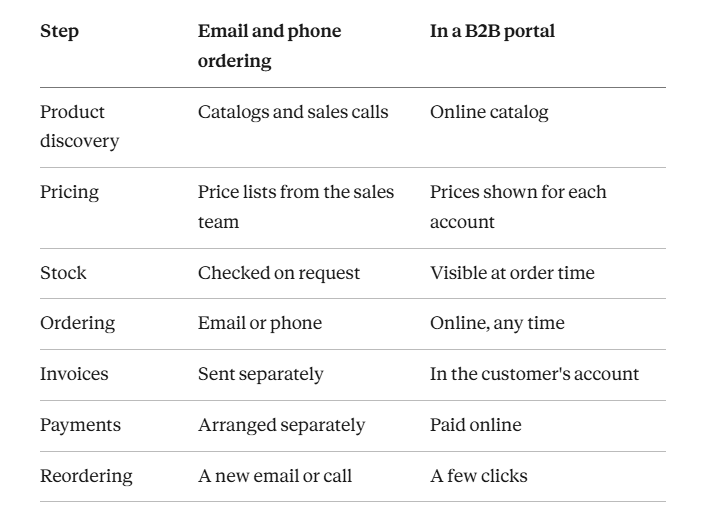
Many wholesale relationships start with catalogs, sales calls and emailed orders. A portal moves each step online:
When a B2B Portal Makes Sense
A portal adds the most value when you have:
- Repeat wholesale customers
- Several price levels
- A large product catalog
- Several sales reps
- Growing wholesale volume
- Both ecommerce and wholesale channels
If several of these apply, wholesale inventory management software with a built-in portal, like Cin7 Core, can carry much of your wholesale ordering.
Connect Your B2B Portal to the Rest of Your Business
Your portal is one part of a wider setup. Cin7 Core integrates with accounting, ecommerce, warehouse, 3PL and shipping tools, so a portal order can run all the way through:
Customer → B2B portal → Sales order → Cin7 inventory → Warehouse or 3PL → Shipping → Invoice and payment → Accounting
Set Up Your B2B Portal with SymConverge
A great B2B ecommerce portal fits your products, customer groups, prices and order flow. SymConverge helps wholesale businesses on Cin7 Core:
- Map customer groups to portals, product lists and price tiers
- Set up order rules, payment options and portal branding
- Choose the right order type for each portal and connect it to accounting
- Link the portal to your warehouse, 3PL and shipping tools
Ready to launch your B2B portal? Book a consultation call and we'll plan your setup together.
Frequently Asked Questions
Related reading
Shipping Automation in Cin7 Core: Automate Labels from Order to Dispatch
How Cin7 Core connects packing, carriers, labels and tracking so every order moves from pick to dispatch in one workflow.
Piyush Chaudhary·3 November 2026·5 min read
Custom Order Management System in Cin7: Purchase Orders and Customer Orders Done Right
How to set up purchase order management, sales order management and the workflows that connect them in Cin7 Core.
Piyush Chaudhary·3 November 2026·8 min read

Customize Your Inventory Management and CRM: A Complete Guide
A simple guide to the role a CRM plays in your business, how it works alongside Cin7, and how to customize both around the way your team sells.
Piyush Chaudhary·30 October 2026·5 min read